tapStat · Black Friday 2026
Your Black Friday sales on your phone, compared with last year
Black Friday 2026 is on 27 November and Cyber Monday on 30 November. On those days you want three answers, fast: are we ahead of last year, what is selling, and is anything broken. tapStat shows all three from your Google Analytics 4 data, on your phone, without opening a laptop.
What a Black Friday dashboard needs
- Today so far against last Black Friday, not against last Friday. Comparing with a normal Friday makes every number look huge and tells you nothing.
- Pace: where you will end the day if the rest of it goes like the same hours last time.
- What carries the day: top products, and the channels and campaigns that bring the orders.
- Problems early: a checkout that breaks on mobile, a best seller that stops selling, or tracking that stops sending data.
How to do it in Google Analytics 4
You can get most of this from GA4 on a laptop. It takes a few reports.
- Revenue against last year. Open Reports, Monetization, Ecommerce purchases. Set the date range to 27 November 2026 and turn on Compare, with a custom range of 28 November 2025, last year's Black Friday.
- The last 30 minutes. The Realtime report shows purchase events from the last half hour. It doesn't show the day's revenue or compare with last year.
- Channels. Open Acquisition, Traffic acquisition with the same comparison to see which channels moved.
- Checkout problems. Build a funnel exploration from view item to purchase and split it by device. Explorations don't work in the official app, so this one needs a laptop.
How tapStat does it
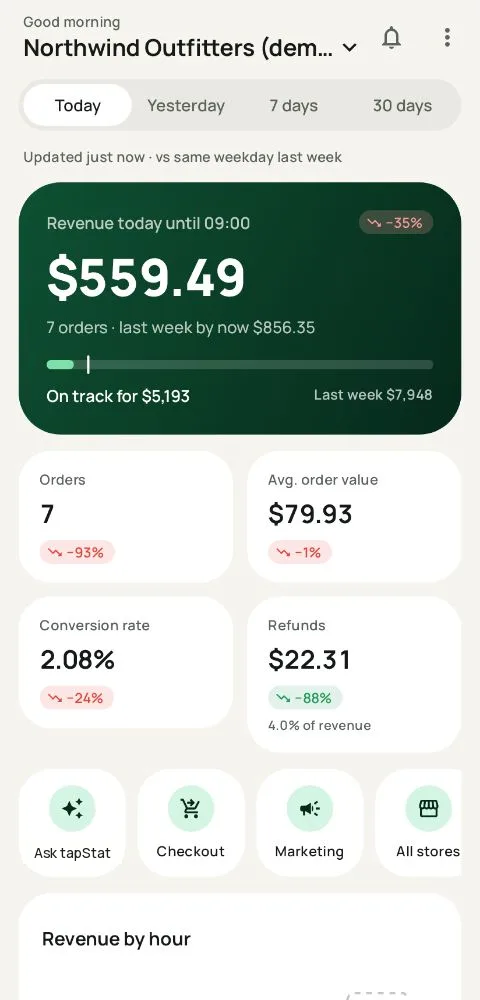
- Open the app. The dashboard opens on today's gross revenue and today's pace: sales so far against the comparison day up to the same hour, with a projection for the whole day. Free.
- Pick "Last Black Friday" as the comparison. Every number on the dashboard, from orders to conversion rate, now compares with last year's Black Friday. Pro.
- Tap any number to see why it changed. tapStat splits the change into traffic, conversion rate and order value, then shows the channels, devices and products behind it. Pro.
Put the widget on your home screen and you won't even need to open the app. Run several stores? The all-stores screen puts the one that needs attention on top.
Catch problems before they cost the weekend
- Tracking health alerts tell you when purchase data stops coming in. Free.
- Product alerts flag a product that spikes or suddenly drops. Pro.
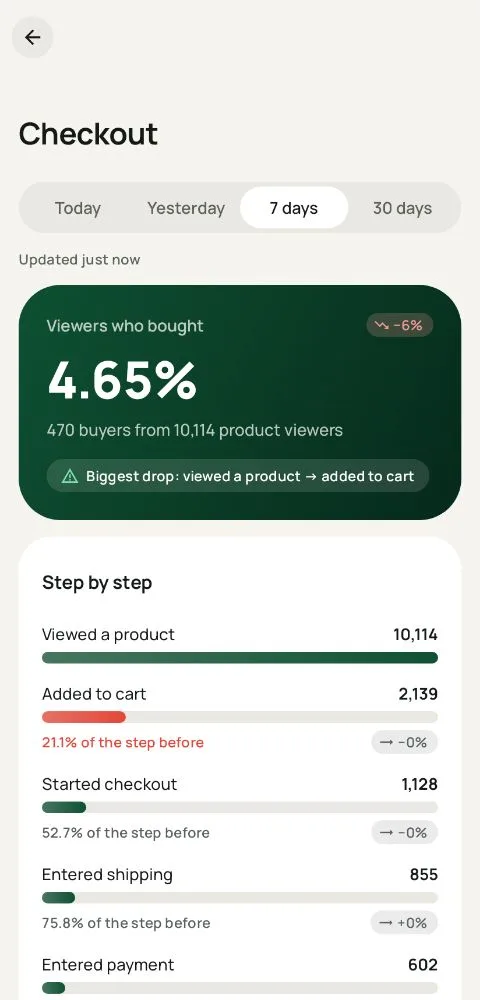
- The checkout funnel shows the step where buyers drop out, split by device. Free.
- The morning brief at 8:00 sums up yesterday, the month so far and what broke. Pro.
Your Black Friday checklist
| When | What to check |
|---|---|
| Two weeks before | Place a test order and check that it shows up in GA4 with the right revenue. Check that ad costs reach GA4 for ROAS (see Meta Ads cost in GA4). |
| The week before | Look at last year's Black Friday hour by hour, so you know what a normal morning looks like. Set a target for the day. |
| On the day | Check pace against last Black Friday every few hours, and watch mobile checkout and your top products. |
| Cyber Monday | Compare with last year's Cyber Monday, 1 December 2025, and with this Black Friday. |
| The week after | Look at refunds and returns, and write a note on what you would do differently next year. |
Questions
When is Black Friday 2026?
Friday 27 November 2026. Cyber Monday is Monday 30 November. Last year Black Friday fell on 28 November 2025.
Can I see Black Friday sales in real time in GA4?
GA4's Realtime report shows purchase events from the last 30 minutes, but not the day's revenue against last year. tapStat shows today's sales so far next to last Black Friday, with a projection for the day.
Why don't my GA4 Black Friday numbers match Shopify?
GA4 misses orders from visitors who decline cookies or block tracking, and it counts revenue differently from your store's order system. A gap of a few percent to around 15% is common. Watch the trend in GA4 and use your store's own order total for the final figure.
Does tapStat work with my store platform?
tapStat works with any store that sends ecommerce events to Google Analytics 4: Shopify, WooCommerce, Shopware, Magento, BigCommerce and others. It reads GA4 with read-only access and changes nothing in your account.
Watch Black Friday from your pocket
Today's pace, last year's Black Friday and alerts when something breaks.