
How to see Meta Ads spend and ROAS in GA4
Google Ads spend shows up in GA4 as soon as you link the accounts. Facebook and Instagram spend doesn't, so return on ad spend for your biggest channel sits in another dashboard. GA4's cost data import fixes that.
What you need
- Editor access (or higher) to the GA4 property.
- Admin access to the Meta ad account.
- Ads tagged with UTM parameters. This is the part most stores get wrong.
Step 1: import the costs
- In GA4, open Admin › Data collection and modification › Data import.
- Choose Create data source, pick Cost data, then Meta as the source.
- Sign in with Facebook and select the ad account. GA4 pulls spend, clicks and impressions daily.
The same import works for TikTok, Pinterest, Snapchat and Reddit, if you advertise there.
Step 2: tag every ad so spend meets revenue
GA4 joins the imported cost to sessions by source, medium and campaign. If the tags on your ads don't match, the spend lands on one row and the revenue on another, and ROAS looks like zero on one and infinite on the other. In Meta Ads Manager, add this to each ad's URL parameters:
utm_source=facebook&utm_medium=paid_social&utm_campaign={{campaign.name}}
- utm_campaign must equal the Meta campaign name. Meta's
{{campaign.name}}placeholder does that for you. - Use the same source and medium on every ad. Instagram placements can keep
utm_source=facebook, or useinstagram; just be consistent. - Don't rename campaigns halfway through a month, or the cost and sessions split again.
Step 3: check the result
Give it a day. In GA4, explore Session campaign with Ads cost and Purchase revenue. Spend and revenue should now sit on the same campaign rows.
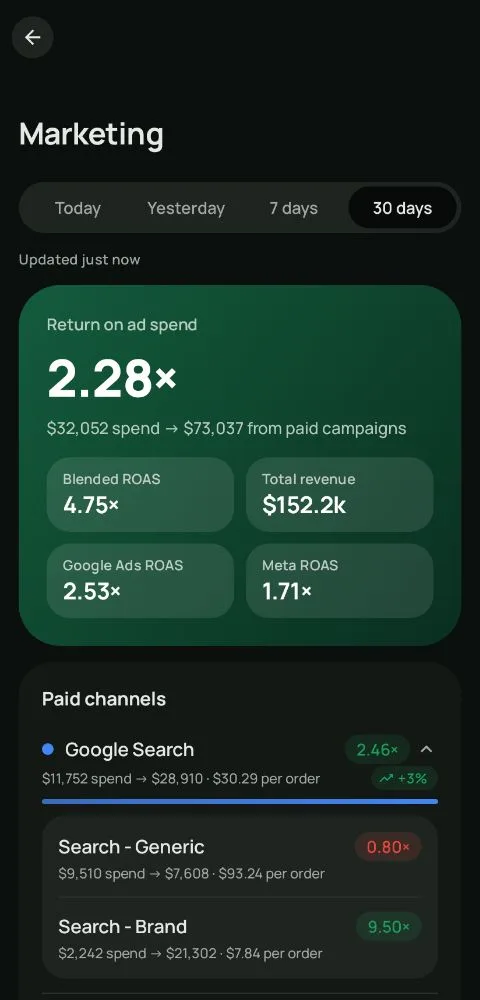
Seeing spend on a row called Meta Ads with no revenue, while paid Facebook and Instagram rows have revenue but no spend? That is the tag mismatch from step 2. tapStat works around it by combining paid Facebook, Instagram and Meta traffic into one Meta Ads channel, so your channel ROAS is right even before your tags are. Per-campaign ROAS still needs matching campaign names.
Read ROAS with care
- GA4 and Meta count differently. GA4 credits sessions by its own attribution; Meta also counts view-through conversions. Expect Meta's own ROAS to be higher.
- Look at blended numbers too. MER, total revenue divided by total ad spend, doesn't depend on attribution at all.
- ROAS isn't profit. A 2.5× ROAS on a product with a 40% margin loses money. Break-even ROAS is 1 ÷ margin.
ROAS, MER and profit on your phone
tapStat reads the spend you import into GA4 and puts it next to revenue.