
tapStat · Comparisons
Compare with the same weekday last year in GA4
Google has removed GA4's "Previous year (match day of week)" comparison. The "Previous year" option that remains compares calendar dates, so this Saturday is compared with whatever weekday the same date fell on last year. For a store, that's often the wrong comparison. Here is how to get a fair one.
Why the weekday matters
Stores sell differently on each day of the week. If 14 November is a Saturday this year and was a Friday last year, the calendar comparison mixes a weekend day with a weekday. Around holidays it's worse: Black Friday moves by a day or more every year, so a calendar comparison can put this year's Black Friday next to an ordinary Thursday last year.
How to do it in GA4
- Find last year's matching day. Go back 364 days, which is exactly 52 weeks, so the weekday is the same. For 27 November 2026, that's 28 November 2025.
- Open your report, for example Reports › Monetization › Ecommerce purchases, and set the date range to this year's day or week.
- Click Compare, choose Custom and enter last year's matching range.
- Apply. Every metric in the report now shows the change against the same weekday last year.
The Google Analytics app supports comparisons too, but entering a custom range on a phone takes a few taps every time, and it doesn't remember your choice for the next day.
How tapStat does it
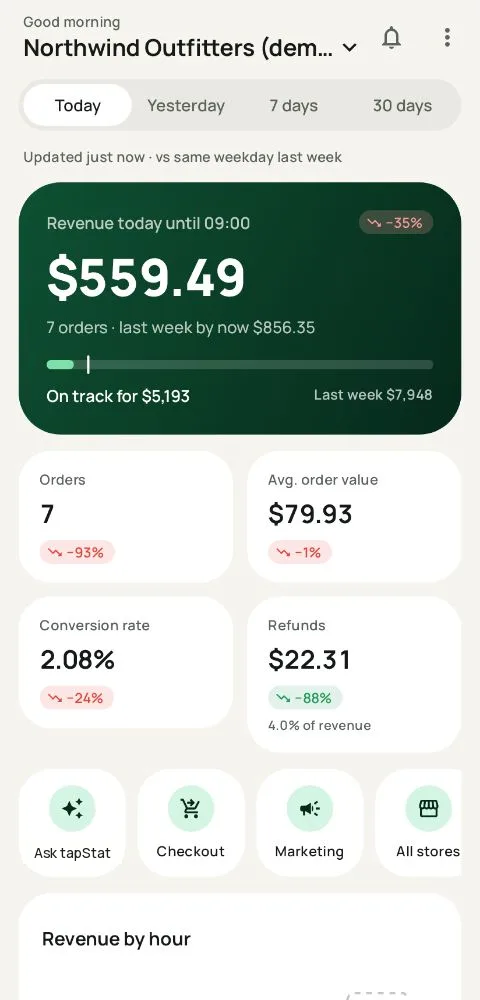
- Free: today, yesterday and the last 7 days are always compared with the same weekday last week. Today is compared up to the same hour.
- Pro: pick any comparison: previous period, the same weekday last year, or last Black Friday. The choice applies to every number, and tapStat remembers it.
- Pro: tap a number to see why it changed against that comparison.
Which comparison to use when
| Question | Compare with |
|---|---|
| Is today normal? | Same weekday last week, up to the same hour |
| Is this week normal? | Previous 7 days, matched by weekday |
| Are we growing? | Same weekdays last year |
| How did our sale do? | Last year's sale on the matching day, such as last Black Friday |
| Is the month on track? | Month to date against a target and last year's month |
Questions
Can GA4 compare the same day of the week last year?
Not with a preset any more. Google removed "Previous year (match day of week)". Use a custom comparison range 364 days earlier, which keeps the weekday.
Why 364 days instead of 365?
364 days is exactly 52 weeks, so the comparison lands on the same weekday. 365 days shifts it by one weekday, or two after a leap day.
Can I compare dates in the Google Analytics app?
Yes, the app has a compare option, but custom ranges take several taps and aren't remembered. tapStat keeps your chosen comparison for every number.
Compare like with like, every day
Same-weekday comparisons are free. Any comparison is in Pro, with 4 days free.