How to check your GA4 ecommerce revenue on your phone
You want one number before your first coffee: how much did we sell? Here are three ways to get it from Google Analytics 4, from free and fiddly to one glance.
First: make sure GA4 knows about your sales
Every option below reads the purchase event. Shopify, WooCommerce and most store platforms send it once you connect GA4, but check before you trust any number:
- In GA4, open Reports › Monetization › Ecommerce purchases.
- Pick yesterday. You should see items and revenue that roughly match your store's own order list.
- If revenue is empty, your purchase event is missing its
valueandcurrencyparameters. Fix that in your store's GA4 integration first.
GA4 revenue will rarely match your store to the cent. Ad blockers, cookie banners and refunds all cause small gaps. Use GA4 for trends and sources, and your store back office for bookkeeping.
Option 1: the Google Analytics app
Install Google's Analytics app, pick your property and open the home screen. Revenue is usually among the summary cards, and you can open the ecommerce reports from the report library. It's free and always available. The catch: comparisons default to the previous period, today's partial day is hard to judge, and there is no widget.
Option 2: a saved report in the browser
On your phone's browser, open GA4, build a report with Date, Purchase revenue and Transactions, and add it to your home screen as a bookmark. It works, but GA4's website isn't built for small screens, and you'll be pinching and zooming.
Option 3: a store-focused app
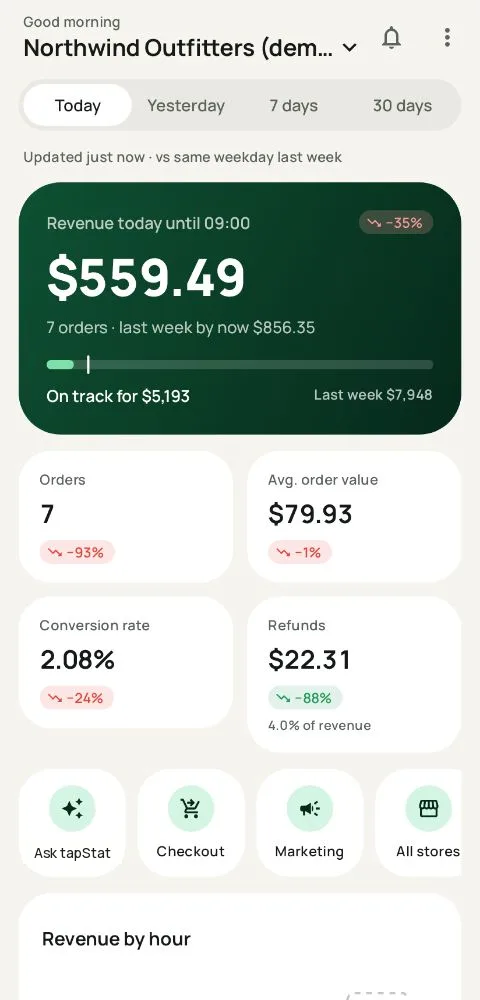
An app like tapStat signs in with Google, asks for read-only Analytics access and opens on your revenue. The difference is in the details:
- Today's pace. Sales so far compared with the same weekday last week up to the same hour, plus a projection for the day.
- A widget. Today's revenue on your home screen, lock screen or watch, without opening anything. See the GA4 widget.
- Alerts. A notification when sales fall well below a normal day for that weekday. See sales alerts.
- The reason. When revenue moves, one tap shows why it changed.
Read the number the right way
Whatever tool you use, compare like with like. Mondays and Saturdays sell differently, so compare with the same weekday last week. Early in the day, compare up to the same hour. And around holidays, compare with the same weekday last year, so Black Friday is measured against last Black Friday. Our guide to comparing with last year shows how, and the Black Friday dashboard page covers the big weekend.
Questions
Can I see my GA4 revenue on my phone?
Yes: in the Google Analytics app, in GA4 in your phone's browser, or in a store-focused app such as tapStat that opens on revenue and adds a widget.
Why is today's revenue lower in GA4 than in my store?
GA4 processes today's data with a delay and misses some orders because of consent and ad blockers. See why GA4 revenue doesn't match Shopify.